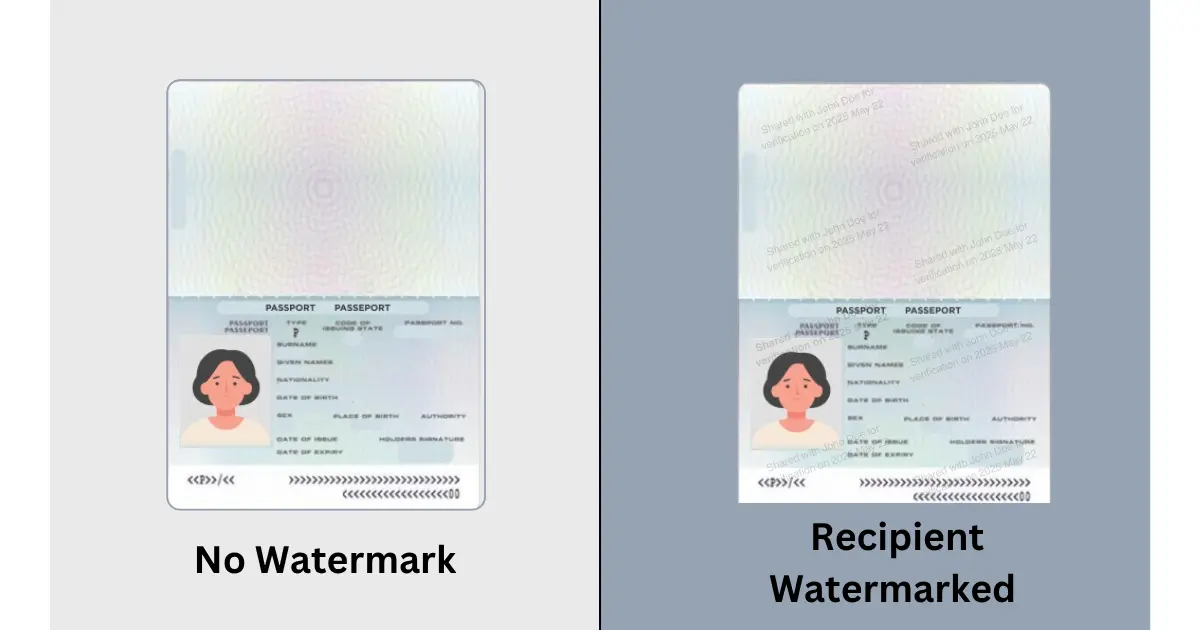
Sharing a passport or identity card copy creates a difficult trade-off. The recipient may need the document for a legitimate check, but the copy contains more information than most people want circulating without context.
A purpose-specific watermark helps resolve part of that tension. It tells anyone who sees the copy why it was created and who it was intended for. That does not make the file impossible to misuse. It makes careless reuse more visible and gives the recipient a responsibility that an unmarked scan does not carry.
What a passport watermark is meant to do
Recipient watermarking is the practice of adding a visible, purpose-specific label to a document before it is shared. A useful label might say “For Riverside Lettings rental application only — 4 August 2026” or “For Hotel Example check-in verification only”.
The point is not decoration. The point is traceability. If the same passport image later appears in another context, the mark can show that it was originally prepared for a particular recipient and purpose.
Watermarking is therefore best understood as an accountability layer. It discourages unauthorised sharing by making every copy attributable to its intended recipient. It does not replace encryption, least-privilege access, or a retention policy.
When watermarking makes sense
Watermarking is useful when a recipient has a defined reason to see the document and the document is likely to be downloaded, reviewed, or passed between staff. Common examples include rental applications, hotel identity checks, recruitment, immigration casework, onboarding, and customer due diligence.
It is less useful when the recipient has not explained the purpose of collection. A watermark should not be used to make an unclear request appear trustworthy. Before sharing, ask who needs the document, why it is needed, how it will be protected, and when it will be deleted.
The safest workflow starts with a controlled document request. The request identifies the organization and the document needed. The watermark then reinforces that context on the copy itself.
What a good watermark should contain
A good watermark is specific enough to establish context and restrained enough to preserve readability. It usually includes the recipient organization, the purpose, and the date or reference associated with the request.
Avoid writing sensitive information into the watermark. A passport number, full address, or unnecessary personal identifier adds exposure without improving accountability. Avoid a large opaque banner that hides names, dates, or machine-readable details required for a legitimate check.
The wording should also be honest. “For rental verification only” describes purpose. “Do not use for any other purpose” expresses an intention, but it does not by itself create a technical restriction. The organization still needs an appropriate access boundary and retention process.
PDF watermarking versus image watermarking
The file format changes the editing task, not the governance principle. A PDF may contain several pages and needs a watermark applied consistently across the document. An image may be easier to mark visually, but it can also be copied, cropped, or re-saved.
The important question is whether the marked copy remains legible and attributable after normal review. A transparent diagonal label may work for a photograph. A smaller repeated label may work better for a multi-page PDF. Before sending, inspect the final file at normal reading size and confirm that the watermark does not obscure essential evidence.
What watermarking cannot do
Watermarks can be cropped, blurred, covered, or removed. That limitation does not make them pointless; it defines their role. The mark adds friction and context, while governed collection provides the stronger record of who requested, received, accessed, reviewed, retained, and deleted the document.
This is why generic watermarks are often insufficient. A label saying “CONFIDENTIAL” signals sensitivity, but it does not identify the recipient or purpose. Recipient-oriented wording creates a more useful accountability trail.
A practical decision before sharing
Ask five questions before preparing the copy:
- Has the recipient explained why the document is needed?
- Is the recipient an identifiable organization or person?
- Can the document be submitted through a controlled route rather than an open inbox or chat?
- Will the watermark preserve the information needed for the check?
- Has the recipient explained access, retention, and deletion?
If the answers are unclear, pause before sending. A watermark improves a defined document exchange; it cannot repair an undefined one.
Read how recipient watermarking supports accountable sharing.
CVOR Guard helps you add recipient and purpose context before sharing sensitive documents.
Explore CVOR Guard →Frequently asked questions
Should I watermark a passport copy before sending it?
A purpose-specific watermark can discourage reuse and make a copy attributable to its intended recipient. It should complement, not replace, a controlled request and access process.
What should a passport watermark say?
It should identify the intended recipient or purpose, such as “For [organization] rental verification only”, without covering essential details or making the document unreadable.
Is a watermark a security control?
A watermark is an accountability measure. Access controls, secure submission, audit trails, and retention governance are still needed to manage the document lifecycle.